
Why controlling the sample in feedback forms is necessary
One of the most common mistakes in customer experience research is assuming that more responses always mean better data. In practice, excessive exposure to feedback forms leads to several problems:
- lower quality responses (people answer automatically),
- user irritation (“another survey”),
- distortion of the sample by very active users.
That is why mature feedback systems introduce sample control mechanisms (sampling). Their goal is not to collect the maximum number of responses, but to gather representative and useful data.
Common mechanisms for limiting the sample
Web forms typically use a few simple rules that control who sees the survey and how often:
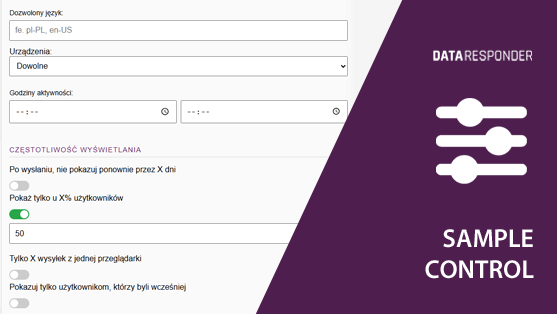
1. Do not show the form again for X days
This is one of the simplest and most widely used mechanisms. After the form is submitted, the system stores information in the user’s browser and blocks the survey from appearing again for a defined period of time.
Example:
- the user completed the form today,
- the system sets a 30-day block,
- during that time the form will not appear again.
When this approach is useful:
- when users frequently return to the website,
- when the form appears automatically (e.g., popup),
- when you want to avoid “survey spam”.
This mechanism protects the user experience and prevents the most active users from dominating the sample.
2. Show the form only to X% of users
Another common method is random respondent selection. The form is shown only to a defined percentage of users.
Example:
- the form has a sampling rate of 20%,
- this means that on average every fifth user will see it.
Advantages of this approach:
- reduces the number of surveys shown to users,
- maintains a stable number of responses even with high traffic,
- ensures randomness of the sample.
This solution is particularly useful in high-traffic services, where without sampling the number of responses would become difficult to manage or would generate excessive amounts of data.
3. Limit the number of submissions from one browser
Another safeguard is limiting the number of responses coming from a single device or browser.
Example:
- a maximum of 3 form submissions from one browser,
- after the limit is reached, the form is no longer available.
This mechanism helps avoid situations where:
- a single user submits many responses,
- company employees repeatedly “test the survey”,
- the data becomes dominated by a small group of respondents.
It is important to remember that this limit usually applies to the browser or device, not to a specific individual.
4. Show the form only to returning users
In many cases it makes sense to collect feedback only from users who already have some experience with the service or product.
Therefore, the form can be displayed only to users who:
- have visited the site before,
- have a stored visit identifier,
- meet certain conditions (for example time spent on the site).
When this limitation makes sense:
- when you want to measure experience rather than first impressions,
- when the survey concerns the quality of a service or process,
- when an opinion requires previous interaction with the product.
This ensures that the survey reaches people who are actually able to evaluate the experience.
How these mechanisms work technically
In most form systems, sample limitations are implemented on the user’s browser side.
The most commonly used mechanisms are:
- cookies or local storage (to remember submissions),
- session randomization when the page is first loaded,
- a browser identifier to control the number of responses.
As a result, these mechanisms operate automatically and do not require user login or the collection of personal data.
Why limiting the sample improves data quality
At first glance, limiting the sample may seem like it reduces the number of responses. In reality, it improves data reliability.
Main benefits:
- a more representative sample,
- fewer repeated respondents,
- less survey fatigue,
- more stable results over time.
In practice, it is often better to have 300 meaningful responses from a well-controlled sample than 3000 responses collected without any control.
How to analyze data from a limited sample
When analyzing results, it is important to remember that sample control changes the way the data should be interpreted.
Practical rules:
- analyze results in trends (week, month, quarter),
- compare segments rather than just the number of responses,
- focus on proportions and the structure of ratings,
- observe the stability of results rather than individual spikes.
In most cases, the consistency of results over time is more important than the number of responses.
Sample control in Data Responder
In Data Responder, web forms can use mechanisms that control the research sample, such as:
- blocking the form from reappearing for a defined period,
- random sampling of users,
- a submission limit per browser,
- display conditions (for example returning users).
This makes it possible to collect feedback in a way that:
- does not overload users with too many surveys,
- ensures a stable and representative sample,
- allows results to be analyzed consistently over time.
Conclusions
Limiting the research sample is not a restriction of research quality – it is a condition for its reliability.
If you want to collect useful feedback:
- control how often forms appear,
- use user sampling,
- limit responses from a single device,
- collect feedback only from users who have context for the experience.
This way feedback forms stop being intrusive surveys and become a stable source of insight about user experience.