
How to use a 3D printer for rapid product model creation
Learn how, with an affordable 3D printer, you can quickly create physical prototypes of devices, test ideas, component fit, and ergonomics – without the need for costly outsourced production.
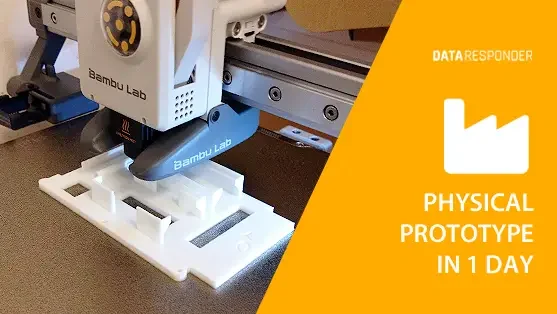
In the world of physical digital product design, the speed of testing ideas is crucial. Before ordering injection molds or outsourcing enclosure production, it’s worth verifying whether the concept actually works in practice. 3D printing makes it possible to go from an idea to “something in your hands” within a few hours – and that is an advantage that is hard to replace.
Why is it worth printing prototypes?
A 3D prototype is more than just a visualization. It is a tangible model that allows you to:
- check the fit of components (PCBs, buttons, connectors, cables),
- test ergonomics – how the device feels in the hand or fits in a pocket,
- verify assembly logic (assembly order, access to screws, snap-fits),
- show the product to investors or partners in a real, physical form,
- avoid costly design mistakes at the production stage.
Instead of waiting weeks for samples, you can print an enclosure within a few hours, adjust the design, and test again. This changes the entire dynamic of product development.
What 3D printing gives a startup (and why it’s an advantage)
In startups, time is currency. A 3D printer provides an advantage not because it produces “nice-looking objects,” but because it shortens the decision-making loop.
- Fast iteration – you print, test, improve, and return with a new version the very same day.
- Lower risk – before spending money on production, you see errors at a 1:1 scale.
- Better communication – a physical model makes discussions with engineers, suppliers, investors, and customers easier.
- “In-the-field” testing – you can check how the prototype works in real conditions (e.g. assembly, transport, usage).
This is prototyping in practice: not perfection, but fast decisions based on what you can see and feel.
Best uses of 3D printing at an early stage
Not everything needs to be printed “production-ready.” The most value comes from simple, purpose-driven prints.
Example use cases:
- Enclosures and variants – different wall thicknesses, shapes, and button layouts.
- Ergonomic mockups – a solid form without electronics, purely to test grip and dimensions.
- Mounting elements – brackets, spacers, guides, supports.
- Front panels – placement of buttons, icons, LEDs, and openings.
- Fit tests – whether the USB port is accessible, cables fit, and screws have enough space.
These are things that cannot be reliably evaluated on a flat screen.
What a sensible process looks like: from idea to prototype in 1 day
If you want to use 3D printing seriously rather than “as a hobby,” you need a working rhythm.
- 1. Define the goal of the print – what question should the prototype answer? (ergonomics, fit, assembly?)
- 2. Model simply – the first version doesn’t need details; the overall shape and critical points matter most.
- 3. Print fast – shorter print times and cheaper materials are better than an “ideal” prototype after 20 hours.
- 4. Test with real components – insert PCBs, check cables, simulate actual use.
- 5. Improve and reprint – iteration is the true value of this tool.
In this approach, the 3D printer is an “iteration engine,” not a production device.
What to keep in mind to avoid common pitfalls
3D printing can also pull you into unnecessary details. A few rules that save time:
- Don’t fight for aesthetics at the start – you’ll refine looks later; focus first on mechanics and ergonomics.
- Test tolerances – what “fits perfectly” in CAD often needs clearance in a real print.
- Design for assembly – remember screws, snap-fits, connector access, and assembly order.
- Create comparative versions – two enclosures with different button layouts tell you more than a discussion.
The biggest mistake is polishing a prototype too early instead of quickly testing hypotheses.
Conclusions
Today, a 3D printer is one of the most affordable and effective tools for rapid prototyping. It allows you to move from an idea to a physical model within a few hours – without external contractors and major costs.
The key is iteration: fast design, testing, and improvement. Each successive print brings you closer to a final product that not only looks good, but also works in the real world.
A practical tip to start with:
Instead of printing a “full enclosure” right away, first print just the front panel (with openings for buttons and connectors) or just the basic shape to test ergonomics. It’s the fastest way to catch errors in one day that would otherwise cost weeks later.